

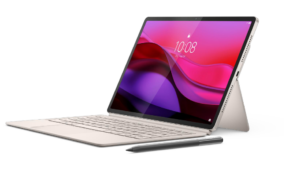
I recently had the pleasure of testing the Lenovo Legion Tab Gen 3. At the end of my review, I commented how it would be wonderful to have a chance to try a larger tablet with the same Snapdragon 8 Gen 3 chip inside. Well, ask and thou shalt receive! Lenovo followed it up with a Lenovo Yoga Plus, a 12.9” powerhouse of a tablet with more features than you can shake a stylus at.
Source: Lenovo
Before we dive in, I want to note one of the main motivations in trying this tablet is that my current tablet, a 2018 iPad Pro, is finally showing its age. I seriously want to know if this can be my daily driver because I need a new tablet and I don’t think I can justify the expense of the current generation of iPads. So this is not just a “because they sent it” review.
First Impressions
The Yoga Tab Plus comes in a well-packed box. I noticed the side has a notation “Lenovo AI Tablet” (because everything has to have AI these days). Inside you will find the tablet, a keyboard cover, a magnetic kickstand, a stylus (plus a spare stylus nib, a rare treat!), a charger, and a USB-C cable. I love that the stylus and pen are included: you’d fork over somewhere between $219-349 to add a keyboard to the iPad, depending on which model you got (assuming we stick to the largest models) plus $79 for a Pencil. Yikes.
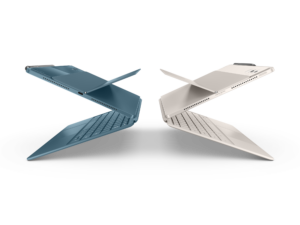
Stylistically, the Yoga Tab Plus feels like a cross between an iPad and a Surface, thanks to the kickstand. I love the glossy back and the camera island across it that houses a 13MP lens, a 2 MP macro lens, and a nice flash. My version of the Tab Plus came in “seashell” (aka white). Photos show a second version, a dark blue “Tidal”, but I have yet to see this in stock anywhere. Not a huge fan of white devices because I am naturally messy, but this is nice.
Aside from the Snapdragon chip we mentioned (and a dedicated Qualcom Adreno 850 GPU we neglected to note), you also get 256 GB of storage and 16 GB of RAM to run your apps in. There’s also dedicated volume up and down buttons on the side, a USB-C port on the bottom, and a power button on the top that also houses a very reliable fingerprint sensor. There is no microSD slot, which is less annoying than it used to be. Apple has never had external storage and it has not hurt them. I will confess that the Legion Tab having two USB ports has spoiled me though! More of that, please?
It was nice to see that the Tab Plus supports Wifi7, even if my house does not. But hooray for future-proofing!
If you are expecting an OLED display, you’re looking at the wrong screen. I don’t think you will notice though; The 3k 12.7” screen is sharp as heck and can get really bright, apparently brighter than some modern iPads or Samsung tablets (900 nits, but who is counting?). The black bezel around the screen feels thicker than it is, and I am not sure why as it is slightly thinner than the one on my 2018 iPad Pro. The tablet itself is a mere 6.69mm thin. Not too shabby!
In terms of speakers, you get a 6 speaker Harmon Kardon system, with Dolby Atmos sound. This absolutely kicked the pants off my aging iPad Pro, which I often have trouble hearing if I am watching something while there is background noise.
The above mentioned screen and speakers make the Tab Plus a more than solid multimedia tablet, but what about productivity? That’s where the keyboard and stylus come in.
My goal for this review was to do most of the article on the tablet itself, and I have to report that it was a delight to type on this keyboard. The keys have a good travel and a satisfying click. I do wish there was a backlight option, although that would drain the battery faster. Like 99% of tablet/keyboard setups, this is meant to be used on a desk, not a lap – that would not be ideal. The trackpad is a perfect size and very responsive. The keyboard also has a dedicated button to launch Lenovo’s AI Now feature (and can also be mapped to launch Gemini).
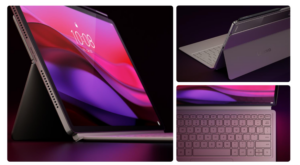
As for the pen, I have to admit that I had trouble figuring out how to pair it at first. It’s so simple really; just put it on the magnet area and it will pair. Except I kept putting it too far up – there is another, weaker magnet that I thought was the right one. Once I got the hang of it, it worked really well. I am not a stylus guy (I should not be allowed near a pen) but it felt good in my hand and was responsive.
Software
On the OS side, the Tab ships with Android 14. Lenovo says they will update for three versions. Mine updated to 16 out of the box, leaving me with one more upgrade to 17. But there are also 4 years of security updates on top of it.
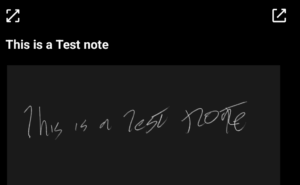
Lenovo adds a lot less bloatware out of the box this time, and it does not feel as random as it did on the Legion Tab Gen 3. Most are things you might want to try with the pen. There is also a lot of special functionality for the pen, like a cool side menu that lets you call up different things, like a notes function with handwriting recognition. Which works really well. We have come a long way since the days of ‘Eat up Martha”.
You can choose between typical Android mode and “PC Mode” (which I am in now as I write this) which feels more like a traditional Windows/Mac/Linux UX interface. It’s interesting how the traditional Android mode has the menus all across the top (like a Mac) but the PC Mode shifts them all to the bottom of the screen (like Windows). To be brutally honest, I quite like the PC mode – more than I like Windows 11 lately. It is clean, elegant, and unsullied by a constant barrage of ads.
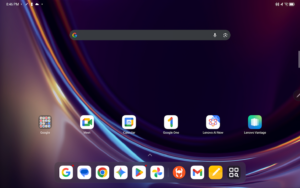
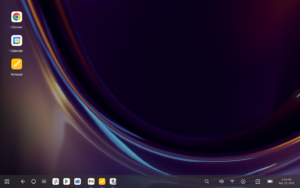
I should note a lot of people seem to find Android on a tablet “less polished” than iPadOS. I am not sure if I agree there. It’s possible that is because I am old and remember how rough Android used to be. There are some quirks, but no more than any other OS on any other platform.
I want to touch on “Lenovo AI Now”, a beta product that I regret I did not have time to test much. I noticed two other reviews complaining that the Lenovo AI was too basic, that it only assists based on what you yourself upload into it. I… kind of love this. It’s more personal and potentially more useful. It reminds me of how you used to be able to go into Microsoft Cortana and edit a preference file locally. In fact, I had a 20 minute conversation with a friend who was looking for exactly this sort of solution. I can see other writers wanting this too.
Daily Use
The goal for this tablet was to see if it can replace my iPad Pro 2018, which I use for the following things
- Watching streaming video
- Writing short emails
- Reading comics
- As an extended monitor for my MacBook when on the road
Despite my iPad Pro’s age, it does a darn good job of these, especially the last one. But it has a slight bend to it from being in my bag too often, and the sound has not been the same for a while.
In terms of watching media, the sound on the Yoga Tab Plus is nothing short of stupendous. It not only kicks the butt of my iPad, it sounds better than a few laptops I have around here. The 3k screen is 2944×1840 pixels, with 273 pixels per inch and a 144 Hz refresh rate. This is better than my old Pro and if I am reading the spec sheets right, comparable to current gen iPad screens. Hnh. The higher refresh rates means video looks great and you should be able to comfortably game on this too (I have not tried).
As I mentioned above, using the keyboard on the Yoga Plus is delightful, meaning I can do more than write emails, I can write entire articles and help edit some for others. I had yet to find a keyboard case I liked for my iPad Pro (other than a Brydge keyboard which weighed more than the tablet did) and tended to use it by extending my MacBook keyboard and mouse to it, which is nuts. This is much more elegant.
Reading comics on the Yoga Tab was perfect. I did have to keep the screen dimmer than I normally do because it can go so bright, but it was the perfect size for my aging eyes. The same IDW Phase 1 collections I tried to read on the Legion Tab but were too squished are perfect on the Yoga; Before I even realized it I had read all 8 volumes in one week!

One iPadOS feature I use almost daily is Sidecar, which lets me use my iPad as a second screen for my MacBook. Because Apple has total control of their hardware/software environment so it is hard to match the Sidecar experience, but it is not impossible! For Windows users, Lenovo has an app called FreeStyle that achieves the same goal. For my fellow Mac users, there are a few solutions. I tried and liked one called TabDisplay.
Battery life is an important factor here. Standby time on the Yoga Tab Plus is an impressive 11 hours on paper, but I generally get it to run longer. After a long day of reading comics and streaming I do need to charge but I would say it is possible to get a solid 6-8 hours off this before you run for a charger. Great for a road warrior.. As for stand-by mode? Feels like forever.
I haven’t touched upon the cameras and that’s because I still cannot believe anyone actually uses tablets for photography, especially ones this big! I do not think I have ever used the rear cameras on any tablet. As for the front, video chatting will be just fine, folks.
Costs
Lenovo is currently offering the Yoga Tab Plus for only $479 (Best Buy, insanely, is selling it for above full price). Considering the cheapest iPad Air is $599, with Pros starting at $999, the Tab Plus has the iPad beat for price. Especially when you remember those iPads have less storage for more cost, and no keyboard or pen.
If you wanted to compare it to another Android tablet, you’d really only be able to compare it to the OnePlus Pad 3 (which is $699 and does not come with pen and keyboard) or the Samsung Galaxy Tab S10 FE Plus ($699), which I have not tested but I will be blunt and say I am not a fan of Samsung’s products at all. Hard pass.
Results
I have not picked up my iPad Pro in 20 days except to make sure it is still charged or look for a specific file All my media consumption and “third screen” work has been done on this Yoga Tab Plus. I can honestly say that if you told me today that I had to get a new tablet, I would have a hard time justifying any other 13” tablet, and I say that as someone who spends 90% of his time in Apple’s Walled Garden. I just cannot justify the price of an m5 or m4 Pro when this does everything I need at a fraction of the cost and zero sacrifices.
If you are looking for a media/productivity tablet and want to not break the bank while also not cheaping out, I suggest you do the same; but don’t sleep on it because that lower $479 price is not going to stick around long.
Note: Lenovo sent me a Yoga Tab Plus for review purposes. They’re nice like that. No affiliate links are in this article.
No Cybertonians were harmed in there writing of this article. Except Waspinator.
